
Binance শুরু
Binance-এ অ্যাকাউন্ট খোলার নিয়ম ২০২৬: রেফারেল কোড, KYC ও ব্যর্থ হলে করণীয়
BN7796 official referral page থেকে Email/phone ও KYC শেষ করুন; completion proof এবং recovery table দিয়ে code failure, duplicate account, Pending ও rejected status সমাধান করুন।
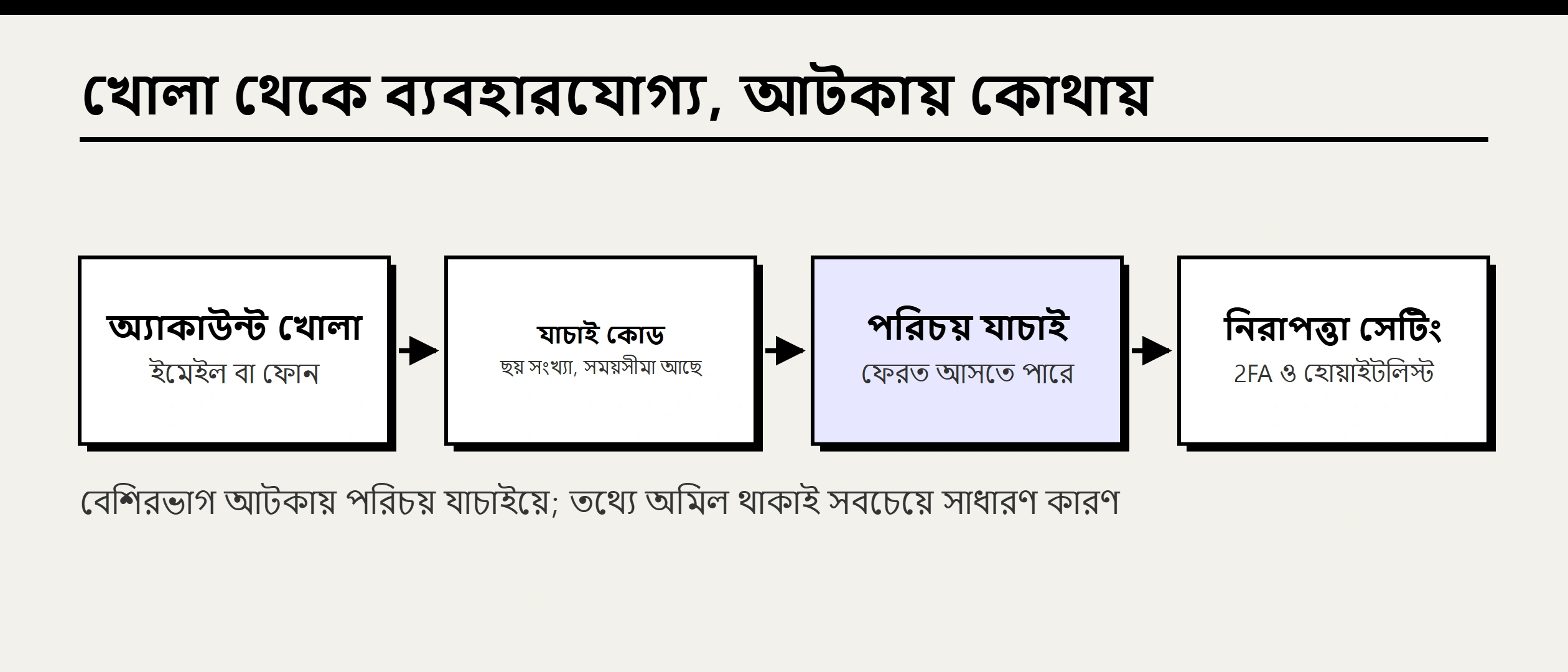
Binance registration-এ common confusion হলো “login account তৈরি”, “identity verification (KYC)” এবং “নির্দিষ্ট product ব্যবহার করার eligibility”—তিনটিকে একই ধাপ ভাবা। Account আগে তৈরি করা যায়, কিন্তু KYC না হলে trading, deposit, withdrawal বা অন্য feature সীমিত হতে পারে। Verification শেষ হলেও available product residence, account type ও local rule-এর ওপর নির্ভর করে।
এই guide Binance-এর 2026 official beginner tutorial অনুযায়ী লেখা এবং site-এর configured referral link অপরিবর্তিত রাখা হয়েছে। Interface, document requirement ও review flow বদলাতে পারে; logged-in screen-ই final। Region restriction bypass করতে VPN বা false information ব্যবহার করবেন না, এবং social media-র “KYC agent”-কে ID, code বা face video দেবেন না।
Contents
- Before signup: চারটি check
- Step 1: official referral link
- Step 2: Email, phone বা social login
- Step 3: six-digit verification code
- Step 4: unique password
- Step 5: KYC identity verification
- KYC failure: common reason
- Step 6: account security setup
- প্রতিটি ধাপের completion proof ও interrupted flow recovery
- Troubleshooting: কোথায় আটকে গেছেন
- After registration: next action
- FAQ
- Disclosure ও official sources
Before signup: চারটি check
1. Residence-এ service available কি না
Binance official page-এ আপনার country/region-এর service ও available product দেখুন। Website খুললেই সব feature legally available—এমন নয়। Region restriction, fiat channel, questionnaire ও product eligibility আলাদা হতে পারে।
2. Individual না entity account
Natural person সাধারণত individual account ব্যবহার করেন। Company, organization বা multi-user permission দরকার হলে official Entity/Institutional route নিন। অন্যের identity দিয়ে personal account বা company use-এর জন্য personal account খুলবেন না।
3. কোন contact method রাখবেন
Long-term controlled Email বা phone ব্যবহার করুন। Exchange-এর জন্য separate mailbox, strong verification ও safe recovery ভালো practice। Phone number-এর ক্ষেত্রে number change, roaming ও SIM swap risk বিবেচনা করুন।
4. KYC document consistent কি না
Legal name, date of birth, residence ও ID data exact match করতে হবে। Region ও risk review অনুযায়ী government photo ID, proof of address এবং live face verification লাগতে পারে। Accepted document ও freshness rule screen-এ দেখুন।
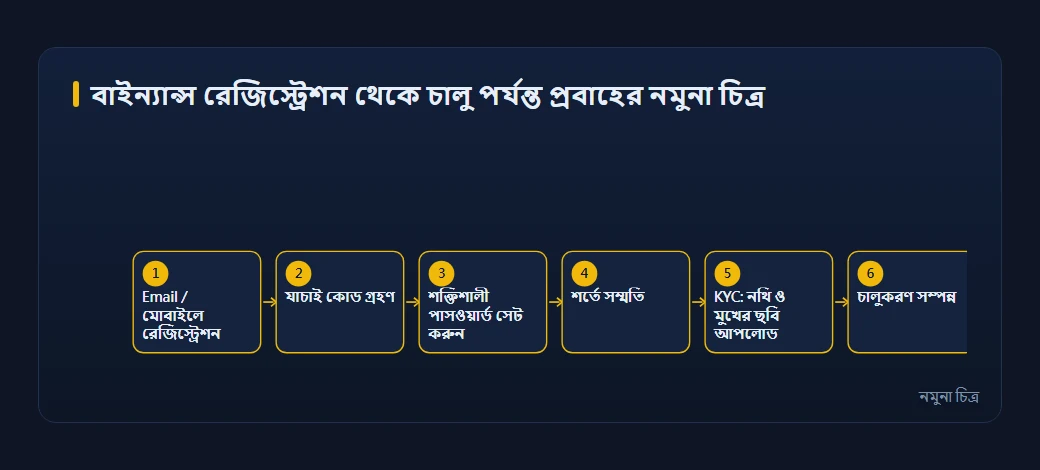
Step 1: official referral link
এই site-এর Binance referral code BN7796। Codeটি ব্যবহার করে registration করলে সর্বোচ্চ ২০% trading-fee discount পাওয়ার সুযোগ থাকতে পারে*।
প্রচার প্রকাশ: নিচেরটি site-এর Binance promotion link; ব্যবহার করা আপনার সিদ্ধান্ত। বিস্তারিত দেখুন অ্যাফিলিয়েট প্রকাশ।
Referral link দিয়ে Binance registration
- Actual discount rate, eligibility ও product coverage Binance registration page এবং current campaign terms অনুযায়ী নির্ধারিত হবে।
Continue করার আগে:
- Official Binance registration domain ও browser warning check করুন।
- Page referral relation বা code দেখায় কি না দেখুন; visible না হলে applied ধরে নেবেন না।
- Promotion, rebate বা fee condition আপনার region/account-এ প্রযোজ্য কি না পড়ুন।
Campaign বদলায়। এই article fixed discount, reward বা fee rate guarantee করে না। Registration screen-এ স্পষ্ট offer এবং eligibility match করলেই benefit valid ধরে নিন।
আপনার অবস্থান ও product eligibility official page নিজেই নির্ধারণ করে, তাই সব region একই screen দেখে না। Registration page যদি কোনো region-specific platform-এ যেতে বলে, আগে সেই platform-এর eligibility, terms ও product difference পড়ে নিন; notice এড়াতে VPN ব্যবহার করবেন না। পেজে দেখানো “up to” rebate-ও fixed promise নয়—আপনার region, account eligibility ও final registration text-ই প্রযোজ্য।
Step 2: Email, phone বা social login
Binance official beginner tutorial-এর registration screen-এ Email/Phone number এবং Google বা Apple option দেখা যায়। আপনার region-এ option আলাদা হতে পারে।
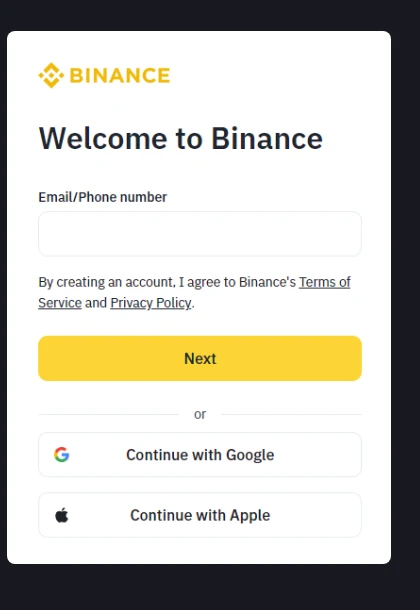
Email বা phone
- Input-এর আগে domain recheck করুন; chat message থেকে URL copy করবেন না।
- Temporary email, online SMS service বা অন্যের number ব্যবহার করবেন না।
- Terms of Service, Privacy Notice ও regional notice পড়ে Continue/Next চাপুন।
Google বা Apple
Social login নতুন password কমাতে পারে, কিন্তু security Google/Apple account-এর ওপরও নির্ভর করবে। সেখানে unique password, passkey/authenticator এবং recovery রাখুন। Shared device-এ signed-in state রেখে যাবেন না।
Step 3: six-digit verification code
Official tutorial অনুযায়ী system Email বা phone-এ six-digit code পাঠায়; সেটি input করে contact method verify করতে হয়।
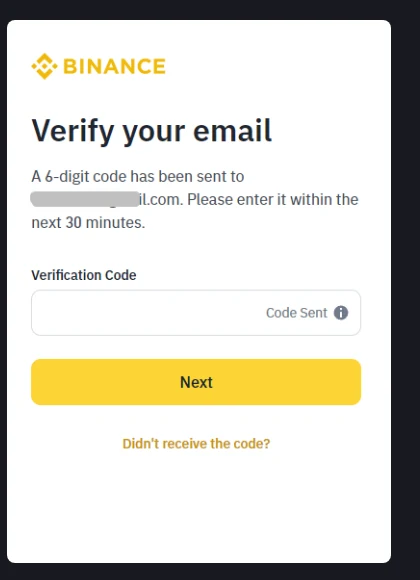
- শুধু আপনার just-initiated signup-এর code ব্যবহার করুন।
- Support, Telegram, WhatsApp বা remote-control session-এ code share করবেন না।
- Code না এলে address spelling, spam folder ও send time দেখুন; original registration page থেকে resend করুন।
- আপনি request না করেও code এলে, কেউ আপনার contact use করার চেষ্টা করতে পারে; code দেবেন না।
Code contact access verify করে; KYC complete বা product access নিশ্চিত করে না।
Step 4: unique password
Binance official tutorial-এর sample-এ minimum 8 character, 1 number এবং 1 uppercase letter requirement দেখা যায়। Current rule বদলাতে পারে; আপনার page follow করুন।
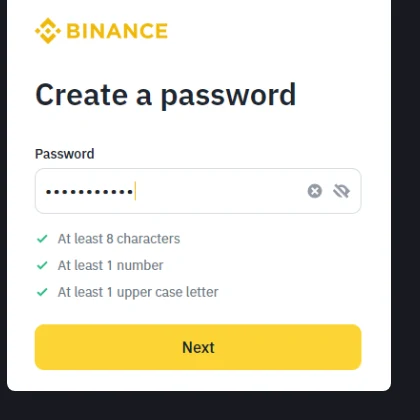
Minimum form rule security target নয়:
- Password manager দিয়ে longer random password তৈরি করুন।
- Email, social media, broker বা অন্য exchange-এর সঙ্গে reuse করবেন না।
- Referral code, birthday, phone suffix বা common phrase ব্যবহার করবেন না।
- Screenshot, synced note বা chat log-এ password রাখবেন না।
- Signup-এর পরে passkey বা authenticator enable করুন।
Step 5: KYC identity verification
Binance Academy স্পষ্ট করে যে account creation ও identity verification আলাদা; KYC incomplete থাকলে trading ও অন্য activity সীমিত হতে পারে। Typical flow:
- Login করে Profile/Account থেকে Identification বা Verification খুলুন।
- True residence country/region এবং individual account নির্বাচন করুন।
- Legal name, birth date ও residential address ID-এর সঙ্গে exact match করে লিখুন।
- Screen-এ accepted passport, national ID বা driving licence type বেছে নিন।
- Clear, complete, unexpired document capture/upload করুন।
- Prompt থাকলে selfie, live face বা motion check complete করুন।
- Submit করে official status/Email result অপেক্ষা করুন; rejection bypass করতে second account খুলবেন না।
Some region বা higher-risk review-এ proof of address, source of funds বা extra review লাগতে পারে। প্রত্যেক user-এর requirement বা limit এক নয়।
Document capture rule
- Even light, no glare, shadow বা filter।
- Four corner visible; text sharp; no crop বা edit।
- Camera permission শুধু current official page/app-কে দিন।
- Name order, ID number ও expiry recheck করুন।
- “Fast approval” agent-কে document পাঠাবেন না।
KYC failure: common reason
| Result | সম্ভাব্য কারণ | Action |
|---|---|---|
| Document unreadable | Blur, glare, crop, unsupported document | Prompt অনুযায়ী clear recapture/accepted ID |
| Face check fail | Low light, permission, obstruction, unstable image | Lens clean, obstruction remove, on-screen motion follow |
| Data mismatch | Name, DOB, residence ID-এর সঙ্গে আলাদা | Legal data correct করুন; abbreviation/translation guess নয় |
| Expired document | ID expired বা address proof old | Current freshness rule অনুযায়ী document |
| Repeated rejection | Manual review বা extra document দরকার | Blind retry বন্ধ করে in-site Support দেখুন |
ID edit করবেন না বা অন্যের document ব্যবহার করবেন না। False data verification failure, restriction ও account-control risk বাড়ায়।
Step 6: account security setup
KYC pass করার পরে deposit-এর আগে:
- Passkey/authenticator: available হলে SMS-only-এর আগে prefer করুন।
- Anti-phishing code: genuine Binance notification চিনতে সাহায্য করে।
- Devices and Activities: unknown ও unused device remove করুন।
- Withdrawal address management: independently verified address, small test first।
- API review: bot/third-party use না করলে API Key তৈরি করবেন না।
Real Security page screenshot ও full steps: Binance account security বাংলা।
প্রতিটি ধাপের completion proof ও interrupted flow recovery
Email delay, camera permission বা manual review-এ signup থামতে পারে। “সম্ভবত শেষ” ধরে নেবেন না, আবার restart করতে দ্বিতীয় account-ও খুলবেন না। এই evidence table ব্যবহার করুন:
| Stage | গ্রহণযোগ্য completion proof | Interrupted হলে recovery route |
|---|---|---|
| Contact verification | Official page code গ্রহণ করে next step দেখায় | Binance official homepage-এর Log In দিয়ে একই Email/phone ব্যবহার করুন |
| Password creation | Official homepage থেকে একই account-এ login করা যায় | Forgot Password/account recovery ব্যবহার করুন; agent-কে password/code দেবেন না |
| KYC submitted | Account verification page-এ Pending, In Review বা equivalent status | একই account-এর Identification/Verification page-এ ফিরুন |
| KYC passed | Account-এ Verified দেখা যায় এবং দরকারি feature region-এ available | Security setup করুন; Verified মানেই সব product enabled নয় |
| Security baseline | Passkey/authenticator active এবং device activity checked | নিজের recovery method test করুন; একমাত্র working method delete করবেন না |
Label language, region ও version অনুযায়ী বদলাতে পারে। Evidence logged-in account-এর ভেতরে থাকতে হবে—Email screenshot, chat agent-এর promise বা অন্য user-এর success screen যথেষ্ট নয়।
Troubleshooting: কোথায় আটকে গেছেন
Email বা phone already registered
নতুন account creation বন্ধ করুন। Official login page-এ existing account বা password recovery চেষ্টা করুন। Account চিনতে না পারলে login page-এর official Support/security route নিন; অন্য ID বা altered name দিয়ে bypass করবেন না।
Code আসেনি, expired বা invalid
Email spelling, country code, spam folder ও request time দেখুন; original registration page-এর Resend ব্যবহার করুন। একাধিক code চাইলে page-এ currently valid code-ই ব্যবহার করুন এবং কোনো code share করবেন না। সমস্যা চললে code ছাড়া error screen সংরক্ষণ করে official Support নিন।
Password তৈরির পর page বন্ধ হয়েছে
Referral link দিয়ে আরেকটি account খোলার চেষ্টা করবেন না। Official homepage-এর Log In-এ verified Email/phone ব্যবহার করুন। Login হলে account page-এ KYC status দেখুন; login না হলে Forgot Password নিন, account নেই ধরে নেবেন না।
KYC দীর্ঘ সময় Pending / In Review
Official page additional document চাইছে কি না দেখুন। নতুন request না থাকলে account notification-এর জন্য অপেক্ষা করুন; আলাদা আলাদা document বারবার upload করলে inconsistency বাড়তে পারে। Paid acceleration, guaranteed approval বা remote-control offer বিশ্বাস করবেন না।
KYC Rejected / Failed
Screen-এর exact reason লিখে শুধু সেটি ঠিক করুন—যেমন blurry ID, data mismatch, expired বা unsupported document। Reason unclear বা retry limited হলে trial-and-error বন্ধ করে logged-in official Support case খুলুন।
Region, document বা product unsupported
এটি eligibility boundary, technical bug নয়। VPN, fake address, অন্যের ID বা entity account দিয়ে personal restriction bypass করবেন না। Alternative দরকার হলে residence-এ আইনসঙ্গত service আলাদাভাবে যাচাই করুন।
After registration: next action
- Account created only: KYC ও security আগে; deposit নয়।
- KYC pending: official result অপেক্ষা; “paid acceleration” এড়ান।
- KYC passed, security incomplete: 2FA, anti-phishing ও device review করুন।
- Ready to buy BTC: funding fee, source ও pair check করে Binance spot Bitcoin guide পড়ুন।
- Planning DCA: frequency, amount ও drawdown tolerance লিখে Bitcoin DCA strategy দেখুন।
FAQ
Account খুলেই KYC করতে হবে?
Account আগে তৈরি করা যায়, কিন্তু Binance Academy অনুযায়ী KYC incomplete থাকলে trading ও অন্য activity সীমিত হতে পারে। Exact access region/account screen-এ দেখুন।
অন্যের phone বা ID ব্যবহার করা যায়?
করা উচিত নয়। Contact, legal identity ও actual user mismatch recovery, compliance ও asset-control risk তৈরি করে।
BN7796 code কি নিশ্চিত ২০% discount দেয়?
এটি fixed guarantee নয়। Codeটি ব্যবহার করে registration করলে সর্বোচ্চ ২০% trading-fee discount পাওয়ার সুযোগ থাকতে পারে; actual rate, region, account eligibility ও product coverage Binance registration page এবং current campaign terms অনুযায়ী নির্ধারিত হবে।
আগেই রেজিস্টার করেছি কিন্তু রেফারেল কোড দিইনি—এখন যোগ করা যাবে?
Binance-এর referral program পাতায় লেখা আছে: রেজিস্ট্রেশনের সময় কোড দিতে ভুলে গেলে পরে binding সম্পন্ন করা যায়, তবে নিচের ছয়টি শর্ত একসঙ্গে পূরণ হতে হবে—KYC তথ্য গত ১৮০ দিনে অন্য কোনো অ্যাকাউন্টে ব্যবহৃত হয়নি, অ্যাকাউন্টে আগে থেকে কোনো referral সম্পর্ক নেই, এটি parent account (sub-account নয়), রেজিস্ট্রেশনের ৩০ দিন পূর্ণ হয়নি, অ্যাকাউন্টে কোনো ডিপোজিট বা ট্রেড নেই, এবং অ্যাকাউন্টটি wash trading হিসেবে চিহ্নিত নয়।
শর্তগুলো বেশ সংকীর্ণ; ব্যবহার করা অ্যাকাউন্টের বেশিরভাগই এতে পড়বে না। একই পাতায় আরও বলা আছে, referral সম্পর্ক একবার তৈরি হলে তা বদলানো বা সরানো যায় না। আপনি যোগ্য কি না এবং binding-এর প্রবেশপথ আপনার জন্য খোলা কি না, তা Binance referral program পাতার বর্তমান বক্তব্য ও লগইনের পরের স্ক্রিন অনুযায়ী নির্ধারিত হবে।
Verification code না এলে?
Email/phone, spam, country code ও send time দেখুন; original official page থেকে resend করুন। Stranger-কে code দেবেন না।
KYC review কত সময় নেয়?
সব account-এর জন্য fixed guarantee নেই। Automation, document quality, region ও additional check timing বদলায়; official status ও notice follow করুন।
Disclosure ও official sources
প্রচার প্রকাশ: Article-এর coded registration entry একটি promotion link; এটি ব্যবহার না করলেও site-এর content পড়া যাবে। Link-এর প্রকৃতি ও সম্ভাব্য স্বার্থের পূর্ণ ব্যাখ্যা অ্যাফিলিয়েট প্রকাশ পাতায় আছে।
- Binance Academy: Binance Beginner's Guide: Email/phone signup, six-digit code, password ও KYC sequence; তিনটি system screenshot এই 2026 official public tutorial থেকে operation area-তে crop করা।
- Binance Support: ব্যক্তিগত অ্যাকাউন্টে পরিচয় যাচাই কীভাবে করবেন: যাচাইয়ের প্রবেশপথ, verification level অনুযায়ী অ্যাকাউন্টের সীমা, এবং যাচাই অসম্পূর্ণ থাকলে ফিচার সীমিত থাকার বিষয়টি মিলিয়ে নিন।
- Binance Academy: What Is KYC: government ID, proof of address, face verification ও regional difference যাচাই।
Screenshot check date: 2026-08-25 (UTC+08:00)। Source example-এর Email Binance নিজেই mask করেছে। Article image-এ real account, Token, Cookie, verification code বা internal URL নেই। Educational operation/security information only; investment, legal বা tax advice নয়।